 Focus sessions
Focus Ordex
Block web distractions, study and work better with focus sessions, schedules, and local stats.
Launch a manual session when you need a protected block of work or study time.
Use schedules for recurring work hours, study periods, or evening boundaries.
Pause, resume, and preview upcoming schedules without leaving Chrome.
Built for one clear browser job.
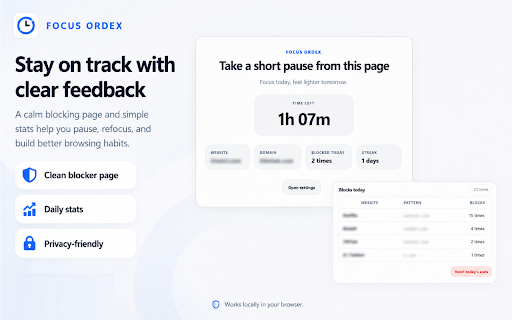
Focus Ordex helps you control distracting websites during work, study, reading, coding, or deep work. Start a manual focus session, create recurring schedules, pause and resume schedules, and use a clean blocking page to get back on track.
Best for: Students, makers, developers, remote workers, and anyone trying to reduce distracting browsing habits.
The problem it solves
A single distracting site can turn a short break into a long detour, especially when work and entertainment happen in the same browser.
Start manual focus sessions with your preferred duration
Create automatic blocking schedules for work hours, study blocks, or routines
Pause, resume, and preview upcoming schedules from the popup
Block selected websites with a clean local-first blocking experience
From install to useful in minutes.
The workflow is intentionally small: install the extension, set up the thing you want to save or control, then use it directly inside Chrome.
Add distracting websites to your blocklist.
Start a manual focus session or create a recurring schedule.
When you visit a blocked site during focus time, a clean block page helps you return to work.
How people use Focus Ordex
Start with the core workflow
Install from the Chrome Web Store, try the everyday workflow, and upgrade only when you need heavier use.
- Run manual focus sessions from Chrome
- Block selected distracting websites
- Use simple local controls for your focus routine
Unlock Focus Ordex Pro
Built for heavier use, larger libraries, better organization, and easy backup.
- More schedules for complex routines
- Advanced focus stats
- Custom block page themes
- Backup and restore
Questions before you install.
What is Focus Ordex best at?
Students, makers, developers, remote workers, and anyone trying to reduce distracting browsing habits.
Does Focus Ordex upload my browsing data?
No. Focus Ordex keeps your extension data in your browser and does not send your snippets, notes, rules, schedules, or tab groups to an Odexly server.
Do I need an account to start?
No. You can install the extension from the Chrome Web Store and use the core workflow without creating an Odexly account.
What can I use for free?
- Run manual focus sessions from Chrome
- Block selected distracting websites
- Use simple local controls for your focus routine
What does Focus Ordex Pro add?
- More schedules for complex routines
- Advanced focus stats
- Custom block page themes
- Backup and restore
Do I need to buy every Odexly product?
No. Each extension has its own Pro path, so you can upgrade only the product that fits your workflow.