 Text expander
Ordex Snippets
Save reusable text snippets and insert them instantly with shortcuts on any website.
Turn approved messages, signatures, and templates into shortcuts you can insert while typing.
Use saved snippets in browser forms, inboxes, support tools, marketplaces, and admin pages.
Your snippets are designed to stay in your browser instead of being synced to an Odexly server.
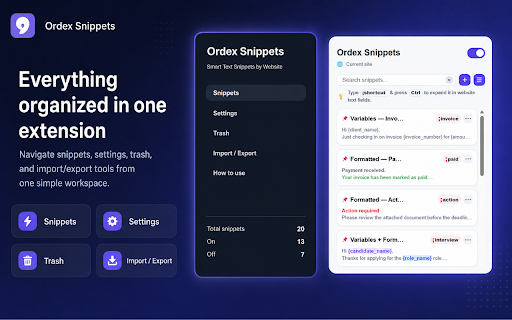
Built for one clear browser job.
Ordex Snippets helps you create, organize, search, and reuse repeated writing across websites. Save approved replies, templates, notes, signatures, support answers, or form responses once, then insert them quickly when you type.
Best for: Support teams, online sellers, creators, admins, and anyone who writes repeated messages online.
The problem it solves
Repeated replies, form messages, and email templates slow people down when they have to be rewritten or copied from scattered files.
Create reusable text snippets for replies, templates, notes, and signatures
Expand snippets with shortcuts and flexible activation keys
Use variables such as name, order ID, company, date, and custom placeholders
Keep snippets polished with rich text formatting, colors, links, and website rules
From install to useful in minutes.
The workflow is intentionally small: install the extension, set up the thing you want to save or control, then use it directly inside Chrome.
Create a snippet for a reply, signature, template, or note you reuse often.
Assign a shortcut or activation key, then type it where you need the text.
Use variables and site rules when a message needs names, dates, or page-specific behavior.
How people use Ordex Snippets
Start with the core workflow
Install from the Chrome Web Store, try the everyday workflow, and upgrade only when you need heavier use.
- Build a starter library of reusable snippets
- Use shortcut activation for everyday replies
- Keep saved text in your Chrome browser
Unlock Ordex Snippets Pro
Built for heavier use, larger libraries, better organization, and easy backup.
- Expanded snippet libraries
- Custom variables for dynamic messages
- Website-specific controls
- Import and export backup
Questions before you install.
What is Ordex Snippets best at?
Support teams, online sellers, creators, admins, and anyone who writes repeated messages online.
Does Ordex Snippets upload my browsing data?
No. Ordex Snippets keeps your extension data in your browser and does not send your snippets, notes, rules, schedules, or tab groups to an Odexly server.
Do I need an account to start?
No. You can install the extension from the Chrome Web Store and use the core workflow without creating an Odexly account.
What can I use for free?
- Build a starter library of reusable snippets
- Use shortcut activation for everyday replies
- Keep saved text in your Chrome browser
What does Ordex Snippets Pro add?
- Expanded snippet libraries
- Custom variables for dynamic messages
- Website-specific controls
- Import and export backup
Do I need to buy every Odexly product?
No. Each extension has its own Pro path, so you can upgrade only the product that fits your workflow.